PeachSim: a clean room iOS and Android simulator
October 26, 2026PeachSim runs iOS and Android apps without booting an iOS or Android system image. We implement the native interfaces that apps use for views, text, input and animation. A C++ compositor draws the result with Skia Graphite on WebGPU and keeps animations running when the app’s JavaScript is busy. React Native JavaScript runs unchanged. Swift apps compile to WebAssembly against our UIKit and SwiftUI, and Kotlin and Compose support is at an earlier stage. PeachSim runs in a browser and as a native app on Mac, Linux and iPhone. We measure its output against Apple’s and Google’s simulators.
Why we built a simulator
In March 2026 a coding agent wiped the drive of our development machine. To run our mobile apps again we had to reinstall Xcode and its simulator runtimes, CocoaPods, Android Studio, the Android SDK and emulator images, and a Java toolchain. Then each app needed a native build before it could show a screen.
So we started building a simulator that runs an app without any of that. A browser prototype worked within days. Matching native rendering and reaching 120 Hz took the next seven months. By October the iOS simulator runtimes installed on one Mac took up 22.5 GB, and PeachSim downloaded 14.5 MB to reach its home screen. We measured the rows below on different dates. For disk, we compare the simulator runtimes and devices installed on one Mac with what PeachSim downloads for a cold boot. For cold start, we compare the time Apple’s simctl takes to boot a device, before any app is installed, with the time PeachSim takes to reach the first app screen.
What PeachSim implements
A mobile app calls system frameworks to create views, lay out content, shape text and handle input. We implement those frameworks and the renderer beneath them, so the app runs without booting a mobile operating system image.
Native apps and React Native apps call the operating system at the same boundary. React Native is furthest along because its app logic is already JavaScript, so at first we only had to supply the native side. Swift apps compile to WebAssembly against our UIKit and SwiftUI, and Kotlin and Compose apps take the same path on Android.
Five requirements
- 1Run the app’s code unchangedWe run React Native’s JavaScript (with Fabric and Yoga), the JavaScript in the app’s packages and the app’s Swift without modifying them. Unlike react-native-web, which swaps native views for DOM elements, we never reimplement app or library JavaScript. We supply only the native side.
- 2Match how the operating system behavesWe follow iOS or Android for spring physics, scroll deceleration, CoreText metrics, keyboard geometry and Liquid Glass shaders. Where the behavior is undocumented, we measure the real system.
- 3Build it clean roomPeachSim contains no Apple or Google operating system code. We build it from public documentation, upstream open source (React Native, Yoga, Skia, swift-foundation) and black-box observation. A separate researcher extracts behavioral specifications, so no proprietary code or decompiled output enters the repository.
- 4Run without a system imagePeachSim needs no hypervisor and no vendor toolchain. It runs in a browser tab, on a CI runner with no GPU, or as a native app on Mac, Linux or iPhone.
- 5Hold 120 Hz and match pixelsWe advance animations at the display’s full refresh rate, up to 120 Hz. When we claim that a screen matches, we compare its pixels with Apple’s and Google’s simulators.
The engine
PeachSim splits its work across three workers, the way iOS splits it across processes and threads. The tenant runs the app’s JavaScript. The shell runs the system UI and acts as the main thread. The compositor is the render server, and only it draws to the GPU. When app JavaScript stalls, scrolling and native-driven animations keep running.
How a native-driven animation runs
In a native-driven animation, the app’s JavaScript declares the curve, spring and target up front. Our native code then samples the animation on each display tick, as Core Animation does, and calls no JavaScript per frame.
On iOS, when an app starts a spring, the model layer jumps to its destination on the first frame. The model layer holds the settled position that the app reads. Core Animation then steps the presentation layer, which holds the live position, toward it, and iOS hit-tests against that moving layer. PeachSim keeps both positions in shared memory. The tenant worker, which runs the app, sees the settled model coordinates immediately. The shell and compositor step the live position on every tick and hit-test against it.
- 1React commits the app’s update.
- 2Yoga computes the layout.
- 3The shell forwards the change to the compositor.
- 4The compositor moves the animation forward.
- 5It redraws what changed.
- 6It submits the frame to the GPU.
The C++ compositor keeps the scene between frames, and it has at most three frames in flight to the GPU. When the screen is still, it submits nothing. When something moves, it redraws only the bounds of the nodes that changed. When a subtree under a transform is stable, the compositor records it as a picture and caches it as a GPU texture, and it spends at most 3 ms per frame on that rasterizing. C++ code steps native-driven springs, timing curves and scroll momentum on every display tick, even while the app’s JavaScript is blocked. One navigation transition used to allocate 150 masks for continuous corners, which took 263 MB at peak. We now clip with an analytic signed distance field, which gives each pixel’s distance to the edge of the shape, and we recycle scratch textures.
Text, layout and view fidelity
Most of the engine’s code is there to get small platform rules right, and each rule here was a visible difference from native until we fixed it. We size text with CoreText’s metrics and the size tables that iOS uses for Dynamic Type. We draw unhinted glyph outlines, keep advances fractional and place glyphs by device pixel. A SwiftUI label hyphenates where UIKit does. We round layout to pixels the way the installed React Native version does. That includes the 0.001 pt epsilon that React Native adds before rounding up, and the invisible capital "I" that an empty Fabric Text node measures to reserve one line of height. 3D transforms keep their perspective and flatten at view boundaries, as in Core Animation. Web views are real browser frames, composited under native transforms, clips and glass.
Accuracy against native
We run each case twice, once on Apple’s or Google’s simulator and once in PeachSim, and compare the results. A visual checkpoint compares pixels, and a semantic checkpoint compares what the app recorded, such as its event log. A hybrid checkpoint needs both kinds to pass. A verdict expires after 30 days, or sooner if its source changes. In August we extended the pixel comparison to the whole screen, and 7 of 339 passing cases became failures.
Real apps
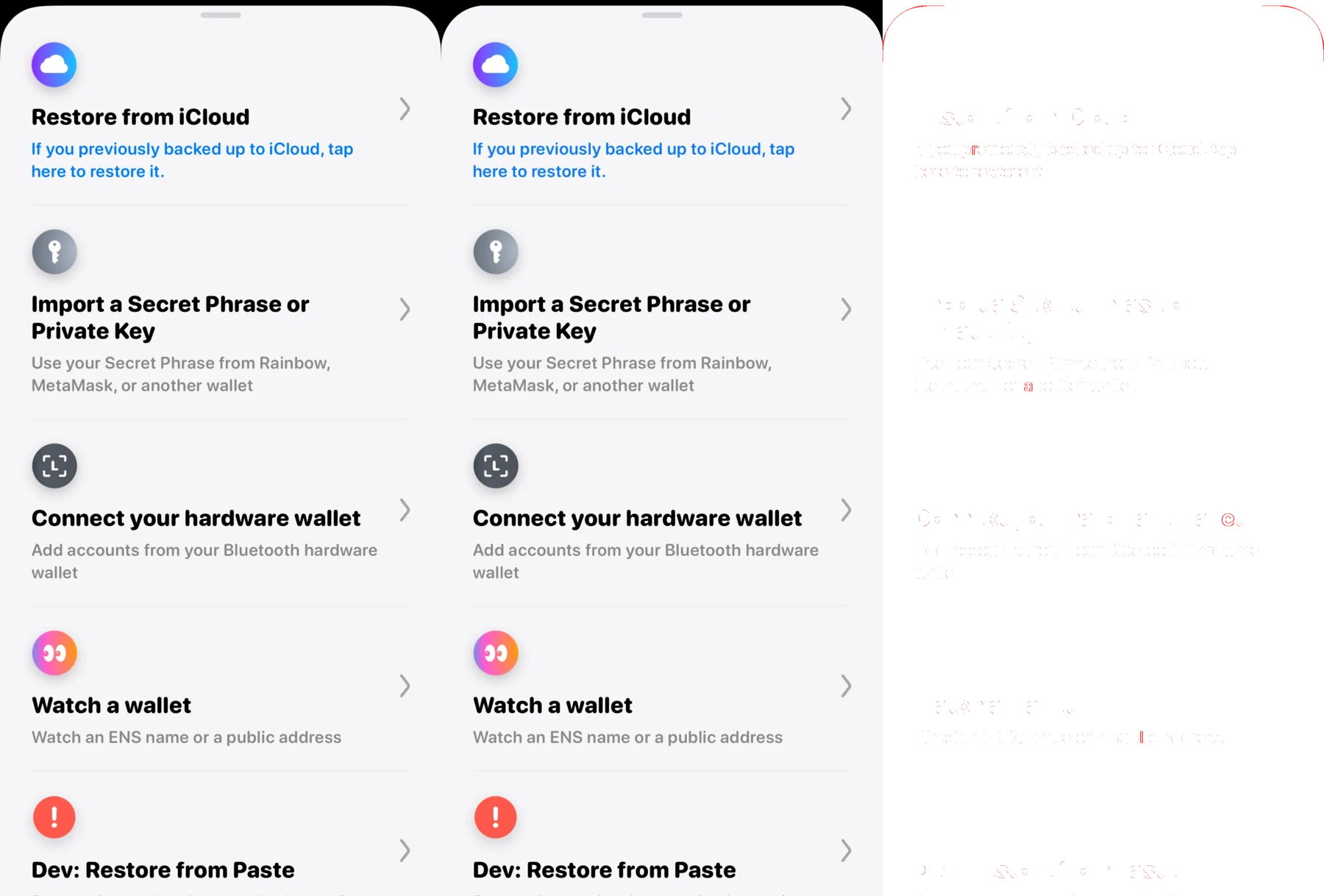
We have run more than 60 unmodified open-source React Native apps in PeachSim. We published the 26 plotted below on October 21. On every screen of each one, at least 99% of pixels match an iOS 27 capture. 12 of them clear the stricter 99.75% bar on every screen. As of this site’s build, the real apps page lists 54 apps and 284 screens, each within 1% of native. The first app took about a month to match, the next took two days, and later apps took half a day each, because every app shares the same engine fixes.
Packages and system surfaces
We also test 56 packages and the system surfaces they draw on: SwiftUI controls through Expo UI, Apple Pay buttons, context menus, sheets, the keyboard, charts, images and maps. These tests have 674 visual checkpoints and 234 semantic ones. Of the visual checkpoints, 559 are within 1% of iOS, and 166 of those are pixel-identical. We publish a package’s update post only when its visual score is 99% or better.
Case study: the Liquid Glass tab bar
The iOS 27 tab bar lifts its selection into a clear lens when pressed. Our renderer describes the lens shape as a signed distance field: at each pixel, the distance to the edge of a capsule with continuous corners. A shader uses that distance and the direction away from the edge to refract the backdrop, which is blurred at several scales. The center magnifies the content beneath it, and the rim bends nearby icons and separates red and blue into a faint fringe. Four highlight bands light the edge, and a color matrix blends the result in gamma-encoded sRGB.
The lens follows a drag on two independent springs, one for its center and one for its width. During movement, their responses are 0.2 and 0.3 seconds, both with 0.85 damping. We compute the edges from the center and width, so a change in tab width does not pull the center off its path.
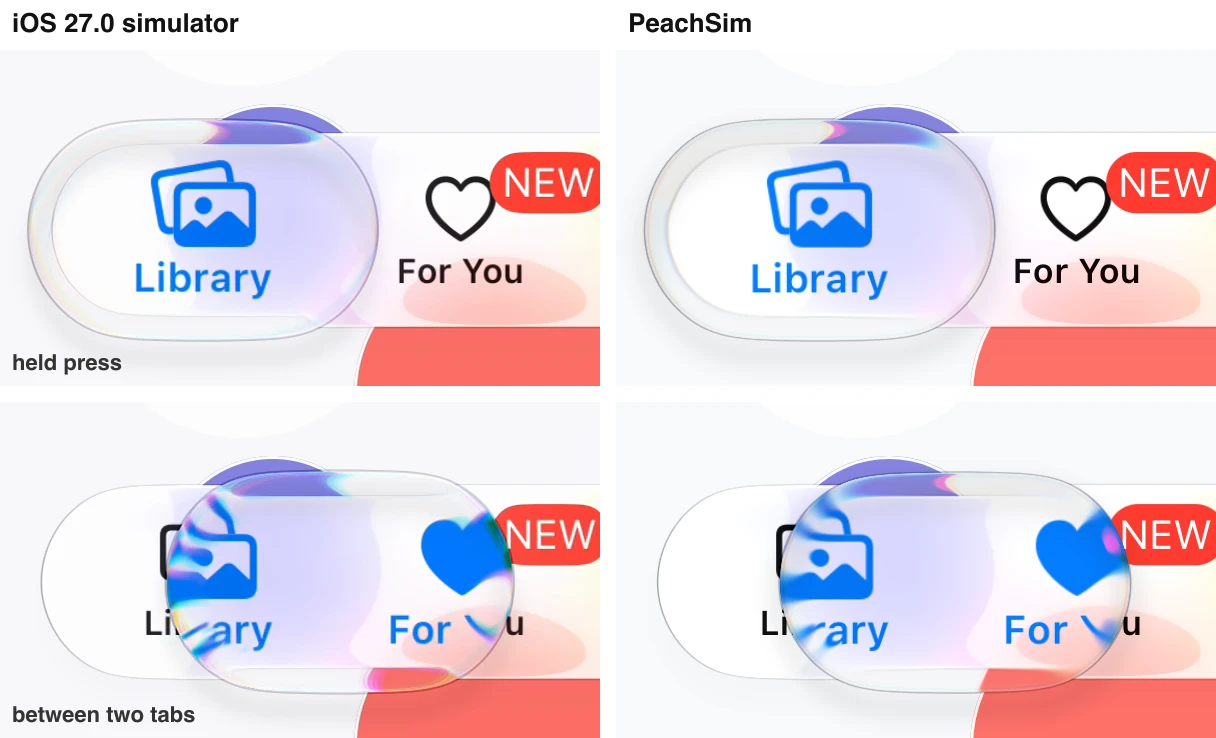
Four builds at the same instants as iOS



The October 11 build drew the lens as an opaque white fill that hid the icon beneath it. Its share of differing pixels dropped from 26% to 16%, while its mean channel error climbed from 8.0 to 10.1. So a build has to pass on both the number of differing pixels and how far off each one is.
Where the tab bar still differs
In the October 26 build the lens body is still slightly paler than native, and its chromatic rim is weaker. When the lens straddles two tabs, iOS renders the incoming tab’s glyph at full tint opacity under the lens mask while PeachSim draws it pale, and the drag position trails native by a few points. In dark appearance the tab bar is still brighter than native. A separate checkpoint grades how the bar shrinks when the page scrolls.
Performance
On the same machine, a one-tap Maestro test finished in 1.5 s in PeachSim and in 11 s on the iOS Simulator. A four-screen Bluesky flow took 9.9 s in PeachSim and 24 s with Maestro on the iOS Simulator.
In a 12 s run of liquid glass motion at 120 Hz, the compositor did 1.75 ms of work per frame on average, and the 95th-percentile interval between displayed frames was 9.89 ms. A missed refresh would show up as an interval near 16.7 ms, and the harness estimated none.
The July and October builds on one harness
We ran the July 26 build (stock CanvasKit on WebGL, TypeScript tree walk) and the October 26 build (Skia Graphite on WebGPU, C++ compositor) under identical touch traces in Chromium 149 on an M3 Ultra. In July the renderer used 520 ms of CPU in every 2 s window on an idle home screen, because it redrew the full canvas on every clock tick. The October build tracks which regions changed and reuses the pictures of promoted layers, and it used 39 ms, 13.3 times less. During a cold boot the renderer used 36% less CPU. During a back swipe, the share of refreshes that got a new frame rose from 44.9% to 75.3%, and the median frame time fell from 33.3 ms to 16.7 ms. Resident memory went the other way, from 694 MB to 1,067 MB after boot. That is the cost of precompiled GPU pipelines and retained backing textures.
Compiling pipelines before first use
Every new combination of draw state needs a GPU pipeline, and compiling one on first use stalls the frame that needs it. On WebGL those stalls ran 100 to 250 ms, and we removed them with targeted warm-up draws. On Graphite a first-use compile inside a flush blocked Chrome’s whole GPU process for 40 to 600 ms. We then tried a broad set of synthetic warm-up draws. They made it worse and froze one boot for 13 seconds. A pipeline is reused only when the draw state matches exactly, so a stand-in draw warms a pipeline that only the stand-in needs. We fixed it by shipping the pipelines that real screens use. We capture them from runs of real flows and compile them at boot. Compiles on a first visit fell from 91 to 0.
For a month we did not see WebKit’s share of the problem, because every WebKit number had been measured warm. A harness that empties the operating system’s shader cache showed a true first visit painting the home screen after 19.1 seconds, against 0.64 seconds warm. WebKit compiles a GPU device’s pipelines one at a time and builds Metal state only at the first draw, so the lasting fix was fewer pipelines. The home screen went from 73 pipelines to about 42. Helper workers also compile each pipeline and draw with it, which warms the Metal cache without occupying the compositor. A true first visit then painted the home screen in 3.5 to 4.4 seconds.
+The largest fixes
+Bugs in our measurements
Several times the bug we found was in the measuring tool.
- JulyThe wrong threadThe default performance readout measured the app’s worker, which never paints. It reported 2,069 frames a second for a visibly janky scroll.
- JulyA cache that never engagedA raster cache had done nothing for months because one tall virtualized list owned its boundary. We now count every rejection and its reason, so a cache that stops engaging shows up in the numbers.
- JulySoftware GPUsHeadless Chromium renders with a software GPU and overstates every cost. We moved benchmarks to GPU-backed browsers on real hardware.
- SeptemberThrottling that missed workersChrome’s CPU throttle slowed the page 3.88 times and a dedicated worker 1.03 times, and PeachSim does almost all its work in workers. We replaced it with a CPU limit set by the operating system. The limit applies to every worker, and the tool that sets it will not run on a busy machine.
- SeptemberCounting hitchesWe replay the same touch traces in Chrome and Safari and count missed 60 Hz ticks. We interleave the runs with an unchanged control, and the control must show no gain. The bar is zero missed ticks.
- OctoberWarm cachesUntil we built a harness that empties the shader cache, every WebKit first-visit number had come from a warm one.
- OctoberWhat the CPU limit cannot measureThe operating system’s CPU limit also slows the display clock, and an empty page’s frame interval stretches to 167 to 200 ms. We use it to estimate what work costs on a phone, and we do not use it to judge frame cadence.
+What did not work
Swift and compiled native code
Our rule since April has been that everything that is JavaScript in a real app runs unchanged, and we supply everything native. For most of the year we supplied it by hand, writing each native module to match what it does on iOS and Android. That works one package at a time. It cannot cover every package that apps depend on, and it does nothing for apps written in Swift. In September we started on a second route. We compile the real native source to WebAssembly and supply the operating system frameworks beneath it.
- MayNative modules written by handEach package’s JavaScript runs unchanged, and PeachSim supplies only its TurboModule or native view, written by hand to match the package’s iOS and Android behavior.
- Sep 14SwiftUI compilesWe compiled a SwiftUI module to WebAssembly with the swift.org toolchain and mounted it in the app’s worker, with working state, events and reload.
- SeptemberThe Apple SDKWe implemented CoreGraphics, MapKit, Charts and StoreKit, then first versions of UIKit, Combine, SwiftData, WebKit and AVFoundation. Foundation is upstream swift-foundation.
- Sep 26Kotlin and ComposeWe compiled Kotlin to WebAssembly, then ran real Compose state, then started pure Kotlin Android apps with no JavaScript at all.
- Oct 2A real UIKit under SwiftUIWe measured UIKit’s core against iOS 27, and local Expo modules written in Swift began compiling automatically against a port of the Expo modules API.
- Oct 13A whole Swift appApple’s Landmarks sample matched iOS 27 on an iPhone 17 Pro profile on all 20 of its screens, between 0.15% and 0.90% of pixels apart.
- Oct 10 to 20NitroWe linked the unchanged Swift and C++ that Nitro Modules generates. Then we matched native’s records of calls, promises, callbacks, identity and disposal, and compiled a published Nitro package from its original sources.
- Oct 23Objective-CWe compiled original Objective-C sources to WebAssembly, the first step toward the older half of React Native’s packages.
Swift support is in beta, and Kotlin and Compose are at an earlier stage. On Android, compiled Compose code records its draw passes into native Skia pictures and hands them to PeachSim’s compositor, so we do not bundle a second copy of Skia. Most native packages from Expo, Software Mansion and Callstack still run on native modules we wrote by hand. Compiling their real native side is what we are working on now.
Browsers and native hosts
For its first three months we built and measured PeachSim mostly in Chrome. The first report of an iPhone tab crashing after a short session came in April. We began working in Safari on an iPhone in June, and by July we were testing mainly there, where the hard problems are memory and WebKit. In October we moved the compositor into native hosts, because we could not go faster than the browser’s own frame clock.
On a 120 Hz Mac, a stock WebKit view caps page rendering near 60 Hz and runs worker frames at about 56 Hz, so more than half of all refreshes showed a stale frame. The Mac app keeps WebKit for the page and runs the compositor in its own JavaScriptCore context on the display link. A prototype held 120 of 120 frames a second, even through 200 ms stalls on the page. The same split runs on Linux over Vulkan. On iOS an app may not allocate executable memory, so we compile the renderer’s WebAssembly ahead of time to C, and its output is identical to the WebAssembly build.
The iPhone memory ceiling
iOS ends a Safari tab that passes its memory limit. No simulator or Mac enforces that limit. Our estimate of that limit moved from a few hundred megabytes to about 2 GB and settled near 1.5 GB for most iPhones. We built a rig that ends the page at the calibrated limit and measures graphics memory separately from the process.
+The largest memory reductions
Bugs in the layers below
Running a whole operating system’s compositor in a browser reaches code paths that few sites do. We found more than 30 defects or undocumented behaviors in V8, WebKit, Skia, Dawn and the drivers beneath them, and worked around each one. For one V8 crash, our first diagnosis was a race in lazy compilation, and turning lazy compilation off seemed to fix it. Then we ran 750 fresh boots per configuration. Every variant still crashed, once in every 100 to 400 boots, at the same code sites, and a reduction that used only stock CanvasKit reproduced the crash.
+Some of the bugs we found
Remote simulators
A remote simulator runs the app on a server, in a headless runtime that uses only the CPU, and streams the scene to the browser in a binary protocol. The stream carries changes to the view tree in fragments, along with Yoga layouts. It also carries native UI requests (alerts, sheets, keyboard traits, permission prompts), the font faces that the session uses, and the descriptor of each native-driven animation, which the engine keeps in shared memory. The browser paints the stream locally with its Skia Graphite compositor and returns pointer, scroll and keyboard events over the same socket. One viewer at a time holds the input lease, which is the right to send input, and other viewers can watch the same instance.
Why a scene and not video
The viewer’s playout buffer
Network packets arrive in bursts. The host stamps each scene commit with the time its frame was produced. While the hosted app reports motion, the viewer holds incoming commits in a playout buffer so that it can show them at the host’s frame cadence. The buffer delays each commit by the smallest recent transit lag plus the 95th-percentile jitter, capped at 50 ms. When the scene is still, the viewer shows each commit when it arrives and skips the buffer, so buffering adds no latency to tap feedback. In a replay of a 60 Hz stream through measured network jitter, the buffer reduced missed display slots from between 10 and 22 to between 2 and 8. Before a session starts, host and viewer check that they agree on the wire subprotocol and on the hashes of the engine, renderer, fonts and assets. A 30 minute soak against production passed 47 of 47 checks.
Previews: recordings that turn back into the app
A preview is a shareable recording for pull requests and bug reports. At any point on its timeline, the person watching can take over the running app.
+Earlier preview designs
- AprilVideo over a live canvasEarly previews captured the app bundle, network responses and input events. They overlaid a recorded video on a live canvas and replayed the events when the user released the scrubber.
- JulyHosted GPU runnerCI machines rarely have GPUs, so we moved recording to a dedicated GPU runner that drove customer builds and encoded video.
- AugustPolled screenshotsThe first hosted viewer polled for static frame images.
- SeptemberBinary scene streamWhen we streamed a full browser tab, we could not crop it to the device bezel and it cost a second runtime, so we built a binary protocol that streams only the simulator’s scene commits.
- OctoberScene recordingsWe began recording that stream, and scene playback became the default share format. Video and the live bundle are options, and any machine can render video offline.
Recording without a GPU
A scene recording is a gzip-compressed container (PSR1). It holds the exact binary frames that a remote viewer receives, each with its arrival offset in milliseconds. It opens at t = 0 with a keyframe that resyncs the full scene, and it lists only the remote images that a paint drew. The container stores scene commits and no pixels, so a CI runner with no GPU can capture a take without rasterizing anything, and any machine can render video afterward by stepping a virtual clock at a locked 60 fps. A 562-frame flow at 1206 by 2622 pixels rendered in 15.6 s on a Mac and in 188 s on a Linux runner with no GPU, with zero dropped frames. Several seconds of interaction take up tens of kilobytes of scene deltas plus 0.2 to 0.6 MB of WOFF2 fonts.
Deterministic replay to a live app
A running React Native app holds state in JavaScript closures, timer queues and native modules, and that state cannot be serialized as a heap snapshot. So when playback hands off to a live session, we rebuild that state by replaying the recording. We boot the app bundle in a hidden worker and restore the initial storage snapshot. We wait until the app reaches the accessibility tree recorded at the start (roles, labels, authored IDs and child order). Then we replay the recorded input events and network responses up to the selected timestamp and swap the live surface onto the screen.
What a recording leaves out
Seven months of rebuilding the engine
We have replaced almost every layer since the first version, several of them twice. Each replacement had to match the one before it pixel for pixel before we deleted the old path.
+The eras by month
- MarchA canvas from the first dayThe first engine drew with Skia’s CanvasKit and laid out with Yoga, so it never rendered through the DOM. We wrote everything above the canvas by hand: a React reconciler, a react-native module that reimplemented View, Text, ScrollView and Animated, JavaScript stand-ins for Reanimated and Gesture Handler, and home-made copies of iOS system apps. Bluesky first rendered on March 29.
- MarchA second engine in RustA Rust engine ran beside the JavaScript renderer. We compiled it to WebAssembly, and it had its own layout, hit testing, scroll physics and draw opcodes. It was faster at layout in benchmarks and twice the code to keep correct. We deleted it in May, which left one layout engine and one renderer.
- AprilRun upstream JavaScript unchangedHand-written copies of package JavaScript drifted from upstream. An app would load, appear to work, then crash several screens in because a stand-in had invented a value or left out an export. We wrote down the rule the project still follows: match exactly what upstream does, never re-create JavaScript logic, and supply only the native side. Through May we replaced every reimplementation with the real package and a native module beneath it.
- AprilOff the main threadIn a prototype we moved painting into a worker and saw that it keeps painting while the page is blocked. Within days we split the engine into a tenant worker for the app and a shell worker for the operating system, so a frozen app no longer froze the home indicator. We moved layout frames and animated values into shared memory two weeks later.
- JulyA compositor of its ownWe added a third worker, the compositor, and only it draws to the GPU. With the host page, that makes the four contexts in Figure 3. Workers stopped sending each other the whole tree and sent flat lists of changes, and nested live layers replaced the single flat recorded picture.
- AugustGraphite on WebGPUWe replaced stock CanvasKit on WebGL with Skia’s Graphite backend on WebGPU, which we build from pinned Skia with our own patches. It ran in Chrome first and in Safari four days later. In the same month we made exact pixels the default comparison against native.
- SeptemberThe native engineWe began moving per-frame execution out of TypeScript into C++, compiled into the same WebAssembly module as Skia. We also began compiling SwiftUI apps to WebAssembly and running them on the same engine.
- OctoberNative hosts and native codeWe moved the compositor into native hosts on Mac, Linux and iOS, where it draws through Dawn, Chrome’s WebGPU implementation, on Metal or Vulkan. We began compiling packages’ own Swift, Objective-C and Nitro sources in place of the native modules we had written by hand.
Moving the frame into native code
From the first week, animated values bypassed React and drove the canvas directly. In April we rewrote springs as closed-form functions of time that any worker can sample. In August we turned animations into compact graphs that the compositor samples from an anchor timestamp. From September we moved per-frame execution into C++ one subsystem at a time, and each had to match the old path pixel for pixel before we deleted its TypeScript.
+What moved and when
JavaScript still handles what an app or the operating system decides: layout inputs, style resolution, typography, shader parameters and asset choices. Reanimated worklets also stay in JavaScript, because they are the app’s own code. The clearest reason to move everything else is that a native iOS host cannot compile JavaScript at runtime, so any JavaScript left on the frame path runs in an interpreter.
+Routes we closed
We built each of these far enough to measure it. We record every closed route, more than a hundred so far, so that nobody spends a week rediscovering one.
How we built it: Team Machine
AI coding agents wrote most of PeachSim. They ran in parallel on eight machines, directed by one person, the owner, through Team Machine, an orchestration system we built alongside the simulator.
+Team Machine, month by month
- MayA terminal wrapper and networkTeam Machine began as a pass-through terminal in front of any coding agent. It recorded each session, kept a rolling summary from a smaller model, let other processes send input and connected machines to each other from the first day.
- JuneA control roomWe built three apps from one React tree: web, a native GPUI desktop shell and an iPhone app on TestFlight. Each has live summaries, a terminal for every session and a feed across machines.
- JulyAn encrypted fleetWe encrypted connections between machines and added device enrollment. One synced repository of instructions, skills and policies deploys to every host.
- AugustTalking to the ownerTeam Machine began routing blocking questions and shared results to the owner’s phone, and coalescing agent mail in the transport. We added a command that waits on one exact condition, after one session spent 82 minutes and 205 tool calls polling a single CI run.
- SeptemberMachines that manage themselvesTeam Machine began to manage worktrees, commit through an isolated index in shared checkouts, tear down resources at the end of a task, place work by capacity and enforce disk floors. A gate on each host pauses the newest heavy job under load.
- OctoberStanding teamsWe set up standing agent teams that start themselves and hand off to fresh successors every 12 hours. We also added a shared pool of Mac and Linux machines for heavy builds, automatic runtime deploys on push, and token accounting by lane and session.
Running an agent fleet
The fleet’s work is divided into lanes, and each lane has a lead agent that directs its workers. The owner directs the leads.
When an operational failure kept recurring, we first wrote a prompt rule against it, then gave it a dedicated agent role, and finally fixed it in code inside Team Machine or the repository: an admission gate, an event watcher, a merge queue or a lint check. The prompts got shorter as code took over. The global agent contract went from 35 KB in July to 13 KB, and task-specific procedures load on demand as skills.
Cutting message traffic
Left alone, agents acknowledge receipts, announce starts and send progress updates. Every message wakes its recipient for a full model turn, so a chatty fleet spends most of its tokens reading its own messages. Prompt rules did not fix that, because each agent judged its own message useful in isolation. Team Machine fixed it in the transport. It coalesces agent mail, and it writes status to a task card that wakes nobody and that each lead reads on its loop. An agent sends an unprompted message only when it is blocked.
Asking, sharing and approval
Agents reach the owner through two channels. A share pushes a result to the phone for review, such as an annotated screenshot, a parity diff or a video cut. A question blocks the session until it is answered, and states what happened, why it matters, the options and a recommendation. Workers ask their lead, who resolves questions inside the lane. A relayed owner approval counts only when it quotes the owner’s exact words.
+How the coordinator’s role changed
- JuneA companionThe coordinator began as an always-on agent that the owner could reach from the phone. It could read every session across the fleet, and it was not yet allowed to start work on its own.
- AugustAn advisorIt could coordinate and recommend, and it asked before starting any worker session.
- SeptemberA staffing managerWe reversed that rule. The coordinator stopped doing work itself and staffed it. It staffed to the capacity of the machines and accounts, whatever the size of the backlog.
- OctoberA front doorLane leads took over staffing their own lanes. The coordinator became the session that the owner talks to, with no background loop of its own.
Standing teams
In October the fleet moved to standing teams that launch themselves. They run on two model families and pair a few large reasoning models with medium and small workers. Leads keep their lanes staffed to the host cores available, replace each worker in the turn it finishes and rotate their own sessions every 12 hours.
+The teams and what they do
Rules the fleet follows
Open gaps
Method and sources
Conformance data comes from the visual proof snapshot generated October 21, 2026 at 16:12 UTC on iOS 27.0 with an iPhone 16 profile, except the tab bar rows noted in the Liquid Glass section. Third-party app scores come from the table we use to accept demo apps. We recomputed the seven comparisons in Figure 8 from saved captures with the conformance comparator. Benchmarks come from dated records that name their host. Histories come from design documents and project records, dated by the change that introduced each step.
References
- 1React Native, The New Architecture and the Fabric renderer. https://reactnative.dev/architecture/fabric-renderer
- 2React Native, SpringAnimation.js. https://github.com/facebook/react-native/blob/main/packages/react-native/Libraries/Animated/animations/SpringAnimation.js
- 3Yoga layout engine. https://yogalayout.dev/docs/about-yoga
- 4Skia CanvasKit. https://skia.org/docs/user/modules/canvaskit/
- 5W3C, WebGPU. https://www.w3.org/TR/webgpu/
- 6WebAssembly Core Specification. https://webassembly.github.io/spec/core/
- 7web.dev, Cross-origin isolation with COOP and COEP. https://web.dev/articles/coop-coep
- 8WebAssembly Binary Toolkit, wasm2c. https://github.com/WebAssembly/wabt
- 9Apple, Liquid Glass. https://developer.apple.com/documentation/technologyoverviews/liquid-glass
- 10Apple, Hardened Runtime. https://developer.apple.com/documentation/security/hardened-runtime
- 11Software Mansion, Reanimated worklets. https://docs.swmansion.com/react-native-reanimated/docs/guides/worklets
- 12Maestro mobile UI testing. https://maestro.dev/